Create Carousel Ads
Generate multi-panel carousel ads from the brand library or Carousel Playground.
Carousel ads are multi-panel stories with continuity across slides. Use them when the offer needs a sequence — benefits, ingredients, or a swipe narrative — rather than a single still.
Prefer the brand path when the brand already exists. Prefer the team Carousel playground when you are still attaching a business.
Before you start
- Correct team and enough credits
- Brand Website present and guidelines reviewed when possible
- Optional: product images as references
- Decide Slide format (Square, Portrait, or Story) and whether panel count is Auto or Custom
Path A — Brand home
- Open the brand. Under Or start from a format, choose Carousel. Or open Carousels in the sidebar and choose New Carousel (or Generate Carousel from the empty state).
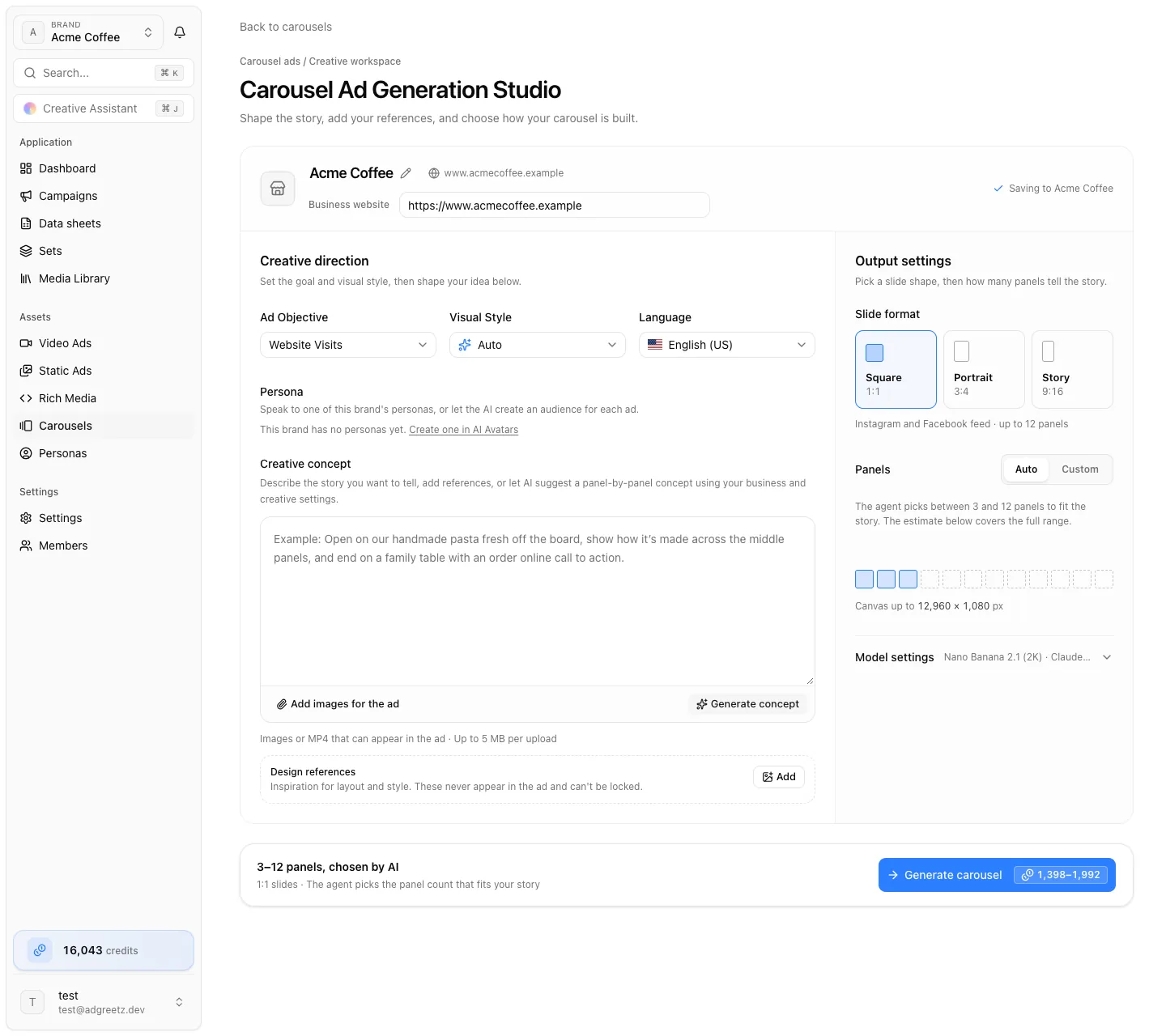
- The brand's Carousel Ad Generation Studio opens at
/home/brands/{brandId}/carousels/create— the same studio as the playground, with the brand already filled in. - Fill Creative direction (objective, style, language, creative concept, images for the ad, design references), then the output settings (slide format, panels, models).
- Choose Generate carousel.
 5. The generation page opens at
/home/brands/{brandId}/carousels/{generationId}.
The brand is locked in this studio: there is no business search, Brand options, or new-brand mode. If you leave the studio before generating, your text and settings are still there when you come back in the same browser tab. Files you attached must be added again. Start over appears once you have changed something and returns the studio to its starting brief.
Path B — Team Carousel Playground
- On the team home, choose Carousel.
- On Carousel Playground (Create multi-panel carousel ads with our agent), use Which business is this ad for? — the same search as Create video ads.
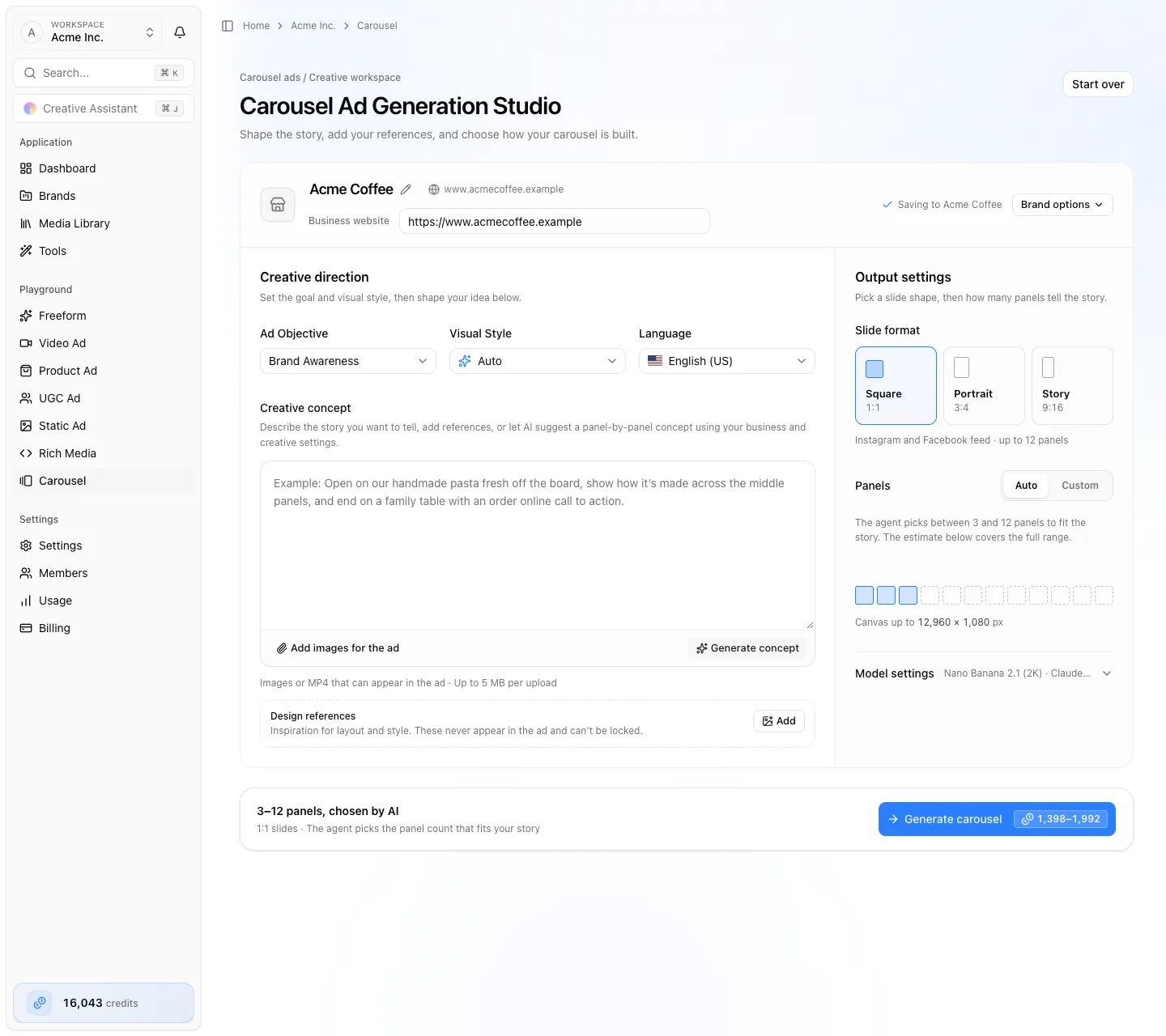
- After a place is selected, the Carousel Ad Generation Studio opens (Shape the story, add your references, and choose how your carousel is built.). There are no Configuration / Content tabs — one studio page holds everything.
- In the brand header, confirm the business name. Open Brand options to Choose an existing brand or Create a new brand. Choose Start over to pick a different business.
- Fill Creative direction, then Output settings, then Generate carousel.
A successful playground run opens /home/brands/{brandId}/carousels/{generationId}.
Studio layout
| Area | What you set |
|---|---|
| Business and brand | Name, website (when missing), and where to save the carousel |
| Creative direction | Ad objective, visual style, language, then the creative concept |
| Output settings | Slide format, panels (Auto or Custom), and model settings |
| Footer | Bar under the card: panel / credit summary and Generate carousel |
Creative direction
| Field | Required? | Notes |
|---|---|---|
| Ad Objective | Yes | Default often Brand Awareness on the playground |
| Visual Style | Yes | Default Auto, plus narrative styles such as Benefit or PAS |
| Language | Yes | Default English (US). RTL languages restrict which image models can draw text |
| Persona | No | On the brand studio, speak to one of this brand's personas, or leave it so the AI creates an audience for each ad |
Creative concept
- Type an optional brief in Creative concept — panel narrative, offer, legal lines
- Generate concept — AI draft of a panel-by-panel concept (uses credits)
- Add images for the ad — upload images or MP4 that can appear in the ad, or browse the Media Library when an existing brand is selected
- Use my images as provided — after attaching an image, turn this on to use your original images without AI editing or regeneration. Images may still be resized, positioned, or cropped to fit the layout
- Design references — inspiration for layout and style. These never appear in the ad and cannot be locked
Output settings
| Field | Required? | Notes |
|---|---|---|
| Slide format | Yes | Square (1:1 feed), Portrait (3:4), or Story (9:16) |
| Panels | Yes | Auto (agent picks within the format's range) or Custom (fixed count) |
| Model settings | Yes | Collapsed summary is often Nano Banana 2.1 (2K) · Claude Opus 5.5. Expand to change Image Model and Writing model. The brand studio uses the same defaults |
After generation
- Wait for status complete on the generation page (Creating Your Carousel → Carousel Ready!), brand Carousels list, or Recent activity.
- Review each panel for continuity, offer clarity, and text size.
- Open the carousel editor when you need panel-level edits.
- Share or publish when Meta (and Instagram, when linked) are connected on the brand — Connect publishing accounts.
Leaving the playground resets the form when you return — each visit is a new transaction.
Adapt to other languages
- On a completed carousel, choose Adapt in the header. If you have unsaved edits, save them first — Adapt uses the saved carousel.
- Pick up to 12 Target languages. The carousel's current language is marked Current.
- Choose Adapt. Each language becomes a new carousel in the brand Carousels list, with the same layout and every live text layer translated. You need a balance of about 200 credits per language to start; you are charged only for the translation actually used.
Each new carousel shows Adapted from →, linking back to the original, and opens in the editor like any other carousel. Hebrew and Arabic get right-to-left text and mirrored alignment; the panel layout is not mirrored. Text inside images, and QR code links, stay as they are.
Where finished carousels appear
- Brand Carousels
- Brand home Recent activity
- Team Recent creations → Carousels